



4smartphones.com
  • Home
  • Reviews
    Xiaomi 17 Pro and Pro Max

    Xiaomi 17 Pro Max Review: Rear Screen, Cameras, Price

    OPPO revealed first rollable Android phone

    OPPO revealed first rollable Android phone

    All the things you should know about iPhone 12 & iPhone 12 Pro

    All the things you should know about iPhone 12 & iPhone 12 Pro

    LG Wing

    LG “Wing” – smartphone with rotatable display

    2019: First foldable smartphones

    2019: First foldable smartphones

    2018: Google makes artificial intelligence available on smartphone

    2018: Google makes artificial intelligence available on smartphone

    2017: More than 2 billion active Android devices per month

    2017: More than 2 billion active Android devices per month

    2016: Google’s first Pixel phone and the exploding Galaxy Note 7

    2016: Google’s first Pixel phone and the exploding Galaxy Note 7

  • Tutorials
    • Samsung
      • Galaxy S3 I9300
      • Galaxy S4 I9500
      • Galaxy S4 I9505
      • Galaxy S5 SM-G900
      • Gear S
      • Galaxy Alpha SM-G850
      • Galaxy A3 A300
      • Galaxy A5 A500
      • Galaxy A7 A700
      • Galaxy Note 3 Neo N7505
      • Galaxy Note 3 N9005
      • Galaxy Note 5 SM-N920
      • Galaxy Note 7 N930
      • Galaxy Tab A 9.7
      • Galaxy S6 SM-G920F
      • Galaxy S6 Edge SM-G925F
      • Galaxy J5 J500
      • Galaxy J7 J700
      • Galaxy S7 SM-G930
      • Galaxy S7 Edge SM-G935
    • Meizu
      • PRO 5
    • Nexus
      • Nexus 5
      • Nexus 5X
      • Nexus 6
      • Nexus 6P
    • Huawei
      • P8
      • P8 Lite
      • P9 Lite
    • Xiaomi
      • Mi5
      • Mi5 Plus
    • iPhone
      • iPhone 4S
      • iPhone SE
      • iPhone 5
      • iPhone 5C
      • iPhone 5S
      • iPhone 6
      • iPhone 6 Plus
      • iPhone 6S
      • iPhone 6S Plus
      • iPad Mini 1
      • iPad Mini 2
      • iPad 4
    • OnePlus
      • OnePlus 3
    • Sony
      • Xperia E4/E4G
      • Xperia Z3
      • Xperia Z4 Tablet
      • Xperia Z5
    • LG
      • LG G3
      • LG G4
      • LG G5
    • Letv
      • 1s
      • Le 2
      • Le 2 Pro
    • HTC
      • One M8
      • One M9
      • 10
    • Uhans
      • U100
    • BlackBerry 10
  • Apps
    • Communication
    • Education
    • Finance
    • GPS
    • Photo & Video
    • Music & Audio
    • Personalization
    • Sports
    • Tools
    • Weather
  • Games
    • Action
    • Adventure
    • Arcade
    • Casino
    • Horror
    • Puzzle
    • Racing
    • RPG
    • Shooter
    • Simulation
    • Sports
  • Android OS
  • iOS
    • 7
    • 8
    • 9
    • 10
  • Ubuntu OS
No Result
View All Result
Subscribe
  • Home
  • Reviews
    Xiaomi 17 Pro and Pro Max

    Xiaomi 17 Pro Max Review: Rear Screen, Cameras, Price

    OPPO revealed first rollable Android phone

    OPPO revealed first rollable Android phone

    All the things you should know about iPhone 12 & iPhone 12 Pro

    All the things you should know about iPhone 12 & iPhone 12 Pro

    LG Wing

    LG “Wing” – smartphone with rotatable display

    2019: First foldable smartphones

    2019: First foldable smartphones

    2018: Google makes artificial intelligence available on smartphone

    2018: Google makes artificial intelligence available on smartphone

    2017: More than 2 billion active Android devices per month

    2017: More than 2 billion active Android devices per month

    2016: Google’s first Pixel phone and the exploding Galaxy Note 7

    2016: Google’s first Pixel phone and the exploding Galaxy Note 7

  • Tutorials
    • Samsung
      • Galaxy S3 I9300
      • Galaxy S4 I9500
      • Galaxy S4 I9505
      • Galaxy S5 SM-G900
      • Gear S
      • Galaxy Alpha SM-G850
      • Galaxy A3 A300
      • Galaxy A5 A500
      • Galaxy A7 A700
      • Galaxy Note 3 Neo N7505
      • Galaxy Note 3 N9005
      • Galaxy Note 5 SM-N920
      • Galaxy Note 7 N930
      • Galaxy Tab A 9.7
      • Galaxy S6 SM-G920F
      • Galaxy S6 Edge SM-G925F
      • Galaxy J5 J500
      • Galaxy J7 J700
      • Galaxy S7 SM-G930
      • Galaxy S7 Edge SM-G935
    • Meizu
      • PRO 5
    • Nexus
      • Nexus 5
      • Nexus 5X
      • Nexus 6
      • Nexus 6P
    • Huawei
      • P8
      • P8 Lite
      • P9 Lite
    • Xiaomi
      • Mi5
      • Mi5 Plus
    • iPhone
      • iPhone 4S
      • iPhone SE
      • iPhone 5
      • iPhone 5C
      • iPhone 5S
      • iPhone 6
      • iPhone 6 Plus
      • iPhone 6S
      • iPhone 6S Plus
      • iPad Mini 1
      • iPad Mini 2
      • iPad 4
    • OnePlus
      • OnePlus 3
    • Sony
      • Xperia E4/E4G
      • Xperia Z3
      • Xperia Z4 Tablet
      • Xperia Z5
    • LG
      • LG G3
      • LG G4
      • LG G5
    • Letv
      • 1s
      • Le 2
      • Le 2 Pro
    • HTC
      • One M8
      • One M9
      • 10
    • Uhans
      • U100
    • BlackBerry 10
  • Apps
    • Communication
    • Education
    • Finance
    • GPS
    • Photo & Video
    • Music & Audio
    • Personalization
    • Sports
    • Tools
    • Weather
  • Games
    • Action
    • Adventure
    • Arcade
    • Casino
    • Horror
    • Puzzle
    • Racing
    • RPG
    • Shooter
    • Simulation
    • Sports
  • Android OS
  • iOS
    • 7
    • 8
    • 9
    • 10
  • Ubuntu OS
No Result
View All Result
4smartphones.com
Home Android

Unbrick Xiaomi Redmi 5 Plus with locked bootloader

in Android, Mi5 Plus, Tutorials, Xiaomi
Reading Time: 3 mins read
0
21
Unbrick Xiaomi Redmi 5 Plus with locked bootloader
576
VIEWS
Share on FacebookShare on XShare on Linkedin

After having worst update experience with one of the latest Xiaomi devices, we decided to share some practice with our readers, giving the best solution we found yet.

As you might already know, part of Xiaomi Redmi 5 Plus releases comes with fake ROM called Miui Global 9.2.0.2. NEGMIEI that can’t be updated over OTA.
Users who tried to make manual update by flashing ROM using Xiaomi Flash tool are now suffering with failed update process which leads to hard bricked device status. Redmi 5 Plus just stuck on boot logo or simply reboots itself countless times.

Here’s the list how many different ROMs we tried and only one of them (marked in bold) successfully brought back Redmi 5 Plus to life:

vince_global_images_8.7.19_20180719.0000.00_8.1_global

vince_global_images_8.7.12_20180712.0000.00_8.1_global

vince_global_images_V9.2.6.0.NEGMIEK_20180122.0000.00_7.1_global

vince_images_V9.2.1.0.NEGCNEK_20171226.0000.00_7.1_cn_f9ef1d52d3

vince_global_images_V9.2.3.0.NEGMIEK_20171222.0000.00_7.1_global

vince_global_images_V9.6.2.0.NEGMIFD_20180608.0000.00_7.1_global

vince_global_images_V9.5.12.0.NEGMIFA_20180525.0000.00_7.1_global

vince_global_images_V9.5.11.0.NEGMIFA_20180521.0000.00_7.1_global

vince_global_images_V9.5.3.0.NEGMIFA_20180322.0000.00_7.1_global

vince_global_images_V9.2.13.0.NEGMIFA_20180302.0000.00_7.1_global

vince_global_images_V9.2.6.0.NEGMIEK_20180122.0000.00_7.1_global

vince_images_V9.6.1.0.NEGCNFD_20180525.0000.00_7.1_cn

vince_images_V9.5.5.0.NEGCNFA_20180504.0000.00_7.1_cn

vince_images_V9.5.4.0.NEGCNFA_20180405.0000.00_7.1_cn

vince_images_V9.5.2.0.NEGCNFA_20180316.0000.00_7.1_cn

vince_images_8.2.1_20180201.0000.00_7.1_cn_bd9ee1a88a

vince_global_images_V9.2.0.2.NEGMIEI_20171209.0000.00_7.1_global

vince_global_images_8.7.12_20180712.0000.00_8.1_global

vince_global_images_8.7.19_20180719.0000.00_8.1_global_f7801e439a

vince_global_images_V9.2.0.2.NEGMIEI_20171209.0000.00_7.1_global


Note 1: After finishing our tutorial Redmi 5 Plus will bootup into China ROM which doesn’t include Google Play or other basic apps. Device will be set with China apps according to its main region. From here you’ll need to flash global ROM which includes all the basic apps and Google services, but this step requires bootloader to be unlocked. We’ll also guide you through this process in our second tutorial.

Note 2: Instructions given below includes test point recovery method where taking off aluminum back cover is a must.

Tutorial:

  1. Using PC download China ROM .tgz file and Xiaomi Flash Tool.
  2. Extract China ROM .tgz file.
  3. Extract Xiaomi Flash Tool and install it into your PC.
  4. Take off Redmi 5 Plus back cover as shown in this video.
  5. Unplug battery cable marked in circle red on the right and take a good look at two test points marked on the left. 
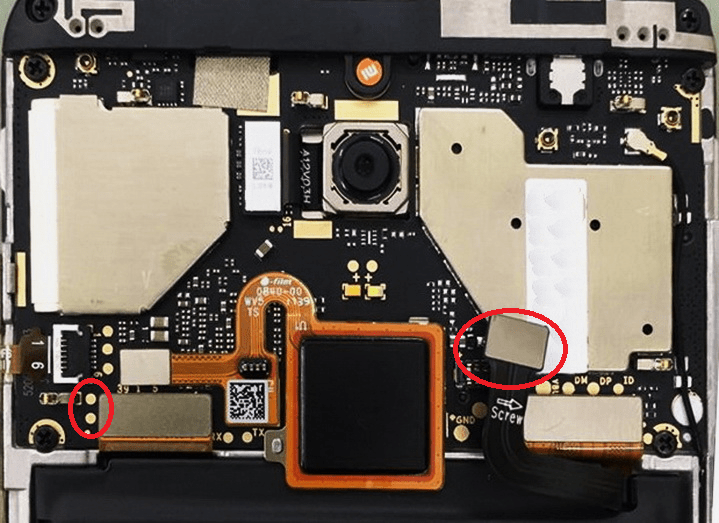
  6. Now start Xiaomi Flash Tool and use a sharp pointed angle tweezer to short the test points firmly. Keep touching them while connecting Redmi 5 Plus via USB cable to PC.
    Check this video if you’re still wondering how to do it.
  7. If everything is done right, refresh Flash Tool and COM10 port should appear.
  8. Click on select and choose China ROM folder.
  9. Click flash to begin flashing process.
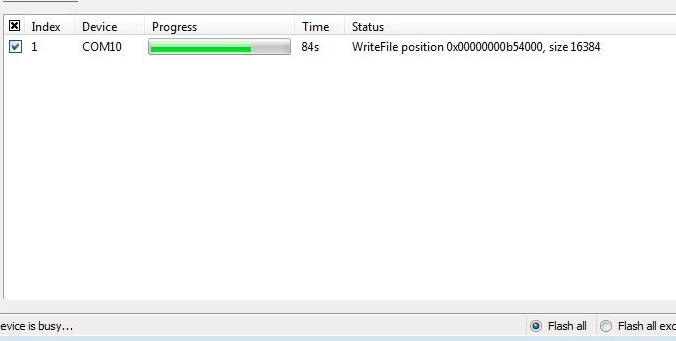
  10. After process is done, disconnect Redmi from PC and connect battery cable back to its place, then power up your device.

Congratulations! Your Redmi 5 Plus is now unbricked.
First boot might take up to 15 minutes, so be patient and do not interrupt the process.

Now you can follow next tutorial to unlock bootloader and upgrade Xiaomi Redmi 5 Plus into Vince Global ROM.
Previous Post

15 Secret iPhone Hacks You Didn’t Know About

Next Post

Xiaomi Redmi 5 Plus IMEI Fix

Next Post
Xiaomi Redmi 5 Plus IMEI Fix

Xiaomi Redmi 5 Plus IMEI Fix

Comments 21

  1. WALLACE PEREIRA DA SILVA says:
    6 years ago

    Link Rom ?

    Reply
    • Admin says:
      6 years ago

      Link to download the ROM is given right in the first step.

      Reply
  2. Jon says:
    6 years ago

    Hi, I do EDL correctly, and my pc recognize the phone, but when I try to flash it says “ack count don’t match” what can I do?? Please help, thanks

    Reply
    • Admin says:
      6 years ago

      Hi Jon, you need to use the Xiaomi flash tool beta. The ack count mismatch error is pertaining to the flash tool.

      Reply
  3. Rundie Merin says:
    6 years ago

    Hi Team, I tried this on my phone. Luckily I got the same phone has the same issue. I was taking care of my phone properly, No damge and it’s like new at all. Until the other day it stucked on the MI logo. I tried pressing the buttons, unfortunately I was only able to get the fastboot mode option. We tried flashing different MIUI ROM unluckily got nothing, Even with this MIUI ROM. I badly need help. Please anyone who can help.

    Reply
    • Admin says:
      6 years ago

      Hello Rundie,

      Can you list the ROM’s you tried to unbrick your Redmi 5 Plus?
      Any luck with our tutorial?

      Reply
  4. Kanak says:
    6 years ago

    it shows “Couldn’t connect to the server. Wait one minute or two and try again fix”. how can i fix this ??
    it cannot activate the device 🙁

    Reply
    • Kanak says:
      6 years ago

      should i try another china ROM ??

      Reply
      • Admin says:
        6 years ago

        Yes, definitely. There’s no other way just to flash the right ROM.

        Reply
    • Admin says:
      6 years ago

      Hello Kanak,

      The thing is that you must flash ROM that has the same Android OS version your phone was running until it got bricked.

      Reply
  5. CooL-8 says:
    7 years ago

    and also the next link tutorial is not working

    Reply
    • Admin says:
      7 years ago

      Thanks for your notice, link has been fixed.

      Reply
  6. CooL-8 says:
    7 years ago

    The internet and sim is not working

    Reply
    • Admin says:
      7 years ago

      Let me make things clear. You finished all the tutorial and mobile internet is not working? Or SIM is not supported?

      Reply
      • Valtn says:
        7 years ago

        Sorry, in english : I have the same problem I think. When entering the pin code, it says “Couldn’t connect to the server. Wait one minute or two and try again ”. We cannot activate the device …

        Reply
        • Admin says:
          7 years ago

          Hello Valtn,

          Do you successfully make all the steps given in the tutorial?

          Reply
          • Jiri says:
            6 years ago

            Hello Admin,

            have the same issue. I unbricked the phone with suggested china ROM, but after phone booted up to the MIUI screen, i connected the phone to Wifi, insert a SIM, but i still get message that the phone can’t be activated. It seems there is some restriction for china users only…

          • Admin says:
            6 years ago

            Hello Jiri,

            You should try another china ROM that just might help. As you saw in our tutorial, we tried a lot of ROM’s to achieve Redmi 5 Plus activation.
            Let me know about your process.

  7. Rogério Gomes says:
    8 years ago

    It didnt worked for me. I tried manter of those roms to but nothing. Do you have any Idea to share?

    Reply
    • Admin says:
      8 years ago

      Write me exact error massage which you get after not succeeding this tutorial? And on which step did you got stuck?

      Reply
  8. Shahin Hasan says:
    8 years ago

    Alhamdulilla.! Thank you for your kind help.

    Reply

Leave a Reply Cancel reply

Your email address will not be published. Required fields are marked *

  • About
  • Contact
  • Privacy Policy
  • Terms & Conditions

4smartphones.com © 2026   All rights reserved.

No Result
View All Result
  • Home
  • Reviews
  • Tutorials
    • Samsung
      • Galaxy S3 I9300
      • Galaxy S4 I9500
      • Galaxy S4 I9505
      • Galaxy S5 SM-G900
      • Gear S
      • Galaxy Alpha SM-G850
      • Galaxy A3 A300
      • Galaxy A5 A500
      • Galaxy A7 A700
      • Galaxy Note 3 Neo N7505
      • Galaxy Note 3 N9005
      • Galaxy Note 5 SM-N920
      • Galaxy Note 7 N930
      • Galaxy Tab A 9.7
      • Galaxy S6 SM-G920F
      • Galaxy S6 Edge SM-G925F
      • Galaxy J5 J500
      • Galaxy J7 J700
      • Galaxy S7 SM-G930
      • Galaxy S7 Edge SM-G935
    • Meizu
      • PRO 5
    • Nexus
      • Nexus 5
      • Nexus 5X
      • Nexus 6
      • Nexus 6P
    • Huawei
      • P8
      • P8 Lite
      • P9 Lite
    • Xiaomi
      • Mi5
      • Mi5 Plus
    • iPhone
      • iPhone 4S
      • iPhone SE
      • iPhone 5
      • iPhone 5C
      • iPhone 5S
      • iPhone 6
      • iPhone 6 Plus
      • iPhone 6S
      • iPhone 6S Plus
      • iPad Mini 1
      • iPad Mini 2
      • iPad 4
    • OnePlus
      • OnePlus 3
    • Sony
      • Xperia E4/E4G
      • Xperia Z3
      • Xperia Z4 Tablet
      • Xperia Z5
    • LG
      • LG G3
      • LG G4
      • LG G5
    • Letv
      • 1s
      • Le 2
      • Le 2 Pro
    • HTC
      • One M8
      • One M9
      • 10
    • Uhans
      • U100
    • BlackBerry 10
  • Apps
    • Communication
    • Education
    • Finance
    • GPS
    • Photo & Video
    • Music & Audio
    • Personalization
    • Sports
    • Tools
    • Weather
  • Games
    • Action
    • Adventure
    • Arcade
    • Casino
    • Horror
    • Puzzle
    • Racing
    • RPG
    • Shooter
    • Simulation
    • Sports
  • Android OS
  • iOS
    • 7
    • 8
    • 9
    • 10
  • Ubuntu OS

4smartphones.com © 2026   All rights reserved.

Welcome Back!

Login to your account below

Forgotten Password?

Retrieve your password

Please enter your username or email address to reset your password.

Log In

Add New Playlist