
4smartphones.com
  • Home
  • Reviews
    Xiaomi 17 Pro and Pro Max

    Xiaomi 17 Pro Max Review: Rear Screen, Cameras, Price

    OPPO revealed first rollable Android phone

    OPPO revealed first rollable Android phone

    All the things you should know about iPhone 12 & iPhone 12 Pro

    All the things you should know about iPhone 12 & iPhone 12 Pro

    LG Wing

    LG “Wing” – smartphone with rotatable display

    2019: First foldable smartphones

    2019: First foldable smartphones

    2018: Google makes artificial intelligence available on smartphone

    2018: Google makes artificial intelligence available on smartphone

    2017: More than 2 billion active Android devices per month

    2017: More than 2 billion active Android devices per month

    2016: Google’s first Pixel phone and the exploding Galaxy Note 7

    2016: Google’s first Pixel phone and the exploding Galaxy Note 7

  • Tutorials
    • Samsung
      • Galaxy S3 I9300
      • Galaxy S4 I9500
      • Galaxy S4 I9505
      • Galaxy S5 SM-G900
      • Gear S
      • Galaxy Alpha SM-G850
      • Galaxy A3 A300
      • Galaxy A5 A500
      • Galaxy A7 A700
      • Galaxy Note 3 Neo N7505
      • Galaxy Note 3 N9005
      • Galaxy Note 5 SM-N920
      • Galaxy Note 7 N930
      • Galaxy Tab A 9.7
      • Galaxy S6 SM-G920F
      • Galaxy S6 Edge SM-G925F
      • Galaxy J5 J500
      • Galaxy J7 J700
      • Galaxy S7 SM-G930
      • Galaxy S7 Edge SM-G935
    • Meizu
      • PRO 5
    • Nexus
      • Nexus 5
      • Nexus 5X
      • Nexus 6
      • Nexus 6P
    • Huawei
      • P8
      • P8 Lite
      • P9 Lite
    • Xiaomi
      • Mi5
      • Mi5 Plus
    • iPhone
      • iPhone 4S
      • iPhone SE
      • iPhone 5
      • iPhone 5C
      • iPhone 5S
      • iPhone 6
      • iPhone 6 Plus
      • iPhone 6S
      • iPhone 6S Plus
      • iPad Mini 1
      • iPad Mini 2
      • iPad 4
    • OnePlus
      • OnePlus 3
    • Sony
      • Xperia E4/E4G
      • Xperia Z3
      • Xperia Z4 Tablet
      • Xperia Z5
    • LG
      • LG G3
      • LG G4
      • LG G5
    • Letv
      • 1s
      • Le 2
      • Le 2 Pro
    • HTC
      • One M8
      • One M9
      • 10
    • Uhans
      • U100
    • BlackBerry 10
  • Apps
    • Communication
    • Education
    • Finance
    • GPS
    • Photo & Video
    • Music & Audio
    • Personalization
    • Sports
    • Tools
    • Weather
  • Games
    • Action
    • Adventure
    • Arcade
    • Casino
    • Horror
    • Puzzle
    • Racing
    • RPG
    • Shooter
    • Simulation
    • Sports
  • Android OS
  • iOS
    • 7
    • 8
    • 9
    • 10
  • Ubuntu OS
No Result
View All Result
Subscribe
  • Home
  • Reviews
    Xiaomi 17 Pro and Pro Max

    Xiaomi 17 Pro Max Review: Rear Screen, Cameras, Price

    OPPO revealed first rollable Android phone

    OPPO revealed first rollable Android phone

    All the things you should know about iPhone 12 & iPhone 12 Pro

    All the things you should know about iPhone 12 & iPhone 12 Pro

    LG Wing

    LG “Wing” – smartphone with rotatable display

    2019: First foldable smartphones

    2019: First foldable smartphones

    2018: Google makes artificial intelligence available on smartphone

    2018: Google makes artificial intelligence available on smartphone

    2017: More than 2 billion active Android devices per month

    2017: More than 2 billion active Android devices per month

    2016: Google’s first Pixel phone and the exploding Galaxy Note 7

    2016: Google’s first Pixel phone and the exploding Galaxy Note 7

  • Tutorials
    • Samsung
      • Galaxy S3 I9300
      • Galaxy S4 I9500
      • Galaxy S4 I9505
      • Galaxy S5 SM-G900
      • Gear S
      • Galaxy Alpha SM-G850
      • Galaxy A3 A300
      • Galaxy A5 A500
      • Galaxy A7 A700
      • Galaxy Note 3 Neo N7505
      • Galaxy Note 3 N9005
      • Galaxy Note 5 SM-N920
      • Galaxy Note 7 N930
      • Galaxy Tab A 9.7
      • Galaxy S6 SM-G920F
      • Galaxy S6 Edge SM-G925F
      • Galaxy J5 J500
      • Galaxy J7 J700
      • Galaxy S7 SM-G930
      • Galaxy S7 Edge SM-G935
    • Meizu
      • PRO 5
    • Nexus
      • Nexus 5
      • Nexus 5X
      • Nexus 6
      • Nexus 6P
    • Huawei
      • P8
      • P8 Lite
      • P9 Lite
    • Xiaomi
      • Mi5
      • Mi5 Plus
    • iPhone
      • iPhone 4S
      • iPhone SE
      • iPhone 5
      • iPhone 5C
      • iPhone 5S
      • iPhone 6
      • iPhone 6 Plus
      • iPhone 6S
      • iPhone 6S Plus
      • iPad Mini 1
      • iPad Mini 2
      • iPad 4
    • OnePlus
      • OnePlus 3
    • Sony
      • Xperia E4/E4G
      • Xperia Z3
      • Xperia Z4 Tablet
      • Xperia Z5
    • LG
      • LG G3
      • LG G4
      • LG G5
    • Letv
      • 1s
      • Le 2
      • Le 2 Pro
    • HTC
      • One M8
      • One M9
      • 10
    • Uhans
      • U100
    • BlackBerry 10
  • Apps
    • Communication
    • Education
    • Finance
    • GPS
    • Photo & Video
    • Music & Audio
    • Personalization
    • Sports
    • Tools
    • Weather
  • Games
    • Action
    • Adventure
    • Arcade
    • Casino
    • Horror
    • Puzzle
    • Racing
    • RPG
    • Shooter
    • Simulation
    • Sports
  • Android OS
  • iOS
    • 7
    • 8
    • 9
    • 10
  • Ubuntu OS
No Result
View All Result
4smartphones.com
Home Android

Xiaomi Redmi 5 Plus IMEI Fix

in Android, Mi5 Plus, Tutorials, Xiaomi
Reading Time: 3 mins read
0
5
Xiaomi Redmi 5 Plus IMEI Fix
282
VIEWS
Share on FacebookShare on XShare on Linkedin

This tutorial is for users who’ve lost IMEI numbers on Xiaomi Redmi 5 Plus devices.
In most cases flashing qcn with qpst may not help to restore IMEI’s so that’s why we came with a detailed tutorial helping users fix this issue.

Tutorial:

  1. Download Qualcomm drivers and install them onto your PC.
  2. Download and install QPST onto your PC.
  3. Open up the Diagnostics Port on Redmi 5 Plus by opening the dialer app and typing in *#*#717717#*#*
  4. Open the directory in which you installed QPST (Usually this is C:\Program Files (x86)\Qualcomm\QPST\bin) Inside that folder launch QPSTConfig.exe and connect device to PC. Make sure that you opened the Diagnostics port on your phone and that it’s visible in Device Manager as a diagnostics port.
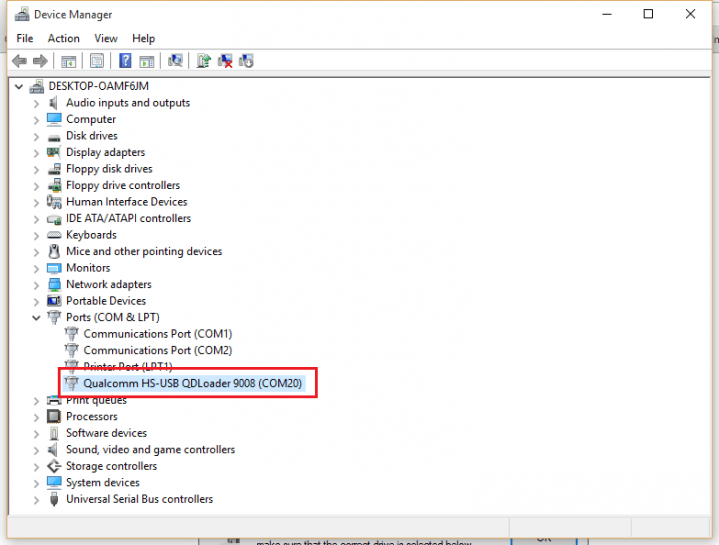
  5. If you see your phone listed in QPSTConfig click on Start Clients and then on Software Download. From there click Backup and Backup your EFS.
  6. Now this is the part where you have to wipe your current EFS because it might be corrupted. To do this, open the dialer app and type in *#*#25327337#*#*
    Xiaomi may reboot during EFS wipe.
  7. Now download and install HxD on your PC.
  8. Download qcn file to your PC.
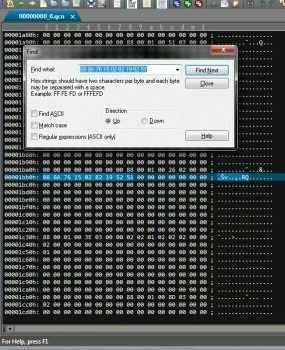
  9. Open qcn file you downloaded using HxD and search for 088a then click on All and set it to Hex. This will bring you to the first IMEI that you need to change into your own. For example:
  10. Download IMEI converter and launch it on your PC.
  11. Put in IMEI that you found in HxD software and click convert.
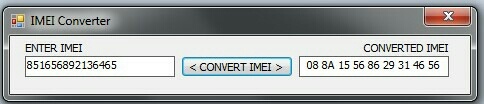
  12. Replace the IMEI in HxD with the converted one. Then click F3 or search again and it should show you the second IMEI you need to change in HxD. Put your second IMEI into IMEI converter and repeat the process. Once that is done save the QCN file.
  13. Once this is completed go back into QPST, click on Software Download and then Restore. Then select your edited QCN file that you saved.
  14. Before clicking on start, make sure Allow phone/file ESN mismatch option is selected as shown below.
    Then click start and your phone should start restoring the QCN file.
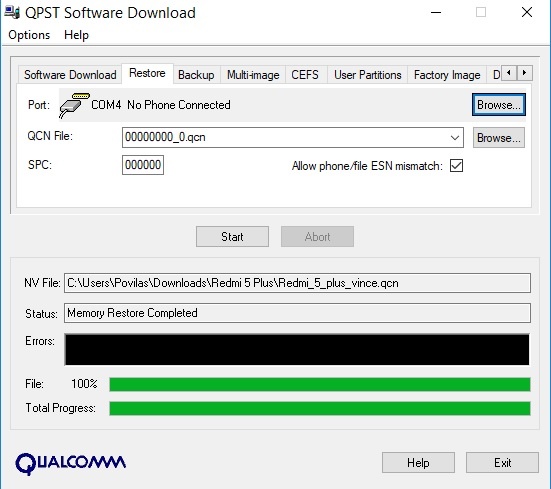
  15. After the restore is done, reboot Redmi 5 Plus.
Congratulations! You’ve just restored your IMEI. If you did everything correctly your IMEI should show up by typing *#06# into the dialer app.

Previous Post

Unbrick Xiaomi Redmi 5 Plus with locked bootloader

Next Post

Huawei has stopped Bootloader unlock services

Next Post
Huawei has stopped Bootloader unlock services

Huawei has stopped Bootloader unlock services

Comments 5

  1. Mr Moklesur Rahman says:
    7 years ago

    My mi 5 plus imei and SIM network has gone.even my phone factory reset korley imei and SIM network chole jay.please help me by solved my problems if anyone know any solution.

    Reply
    • Admin says:
      7 years ago

      Hello Moklesur,

      Have you tried this tutorial?

      Reply
  2. zaky says:
    7 years ago

    i flashed my phone but imei gone, then i try to gix imei with other qcn file but the imei not the same as box when first i buy, can this step restore to my own

    Reply
    • Admin says:
      7 years ago

      Yes, following this tutorial you’ll be able to restore original IMEI.

      Reply
  3. JOHN says:
    7 years ago

    Kindly help after following all the steps correctly it only changes IMEI 1 to mine but imei 2 remain the same even after successfully editing them to mine .. now after connecting to wifi it is mi account locked.

    Reply

Leave a Reply Cancel reply

Your email address will not be published. Required fields are marked *

  • About
  • Contact
  • Privacy Policy
  • Terms & Conditions

4smartphones.com © 2026   All rights reserved.

No Result
View All Result
  • Home
  • Reviews
  • Tutorials
    • Samsung
      • Galaxy S3 I9300
      • Galaxy S4 I9500
      • Galaxy S4 I9505
      • Galaxy S5 SM-G900
      • Gear S
      • Galaxy Alpha SM-G850
      • Galaxy A3 A300
      • Galaxy A5 A500
      • Galaxy A7 A700
      • Galaxy Note 3 Neo N7505
      • Galaxy Note 3 N9005
      • Galaxy Note 5 SM-N920
      • Galaxy Note 7 N930
      • Galaxy Tab A 9.7
      • Galaxy S6 SM-G920F
      • Galaxy S6 Edge SM-G925F
      • Galaxy J5 J500
      • Galaxy J7 J700
      • Galaxy S7 SM-G930
      • Galaxy S7 Edge SM-G935
    • Meizu
      • PRO 5
    • Nexus
      • Nexus 5
      • Nexus 5X
      • Nexus 6
      • Nexus 6P
    • Huawei
      • P8
      • P8 Lite
      • P9 Lite
    • Xiaomi
      • Mi5
      • Mi5 Plus
    • iPhone
      • iPhone 4S
      • iPhone SE
      • iPhone 5
      • iPhone 5C
      • iPhone 5S
      • iPhone 6
      • iPhone 6 Plus
      • iPhone 6S
      • iPhone 6S Plus
      • iPad Mini 1
      • iPad Mini 2
      • iPad 4
    • OnePlus
      • OnePlus 3
    • Sony
      • Xperia E4/E4G
      • Xperia Z3
      • Xperia Z4 Tablet
      • Xperia Z5
    • LG
      • LG G3
      • LG G4
      • LG G5
    • Letv
      • 1s
      • Le 2
      • Le 2 Pro
    • HTC
      • One M8
      • One M9
      • 10
    • Uhans
      • U100
    • BlackBerry 10
  • Apps
    • Communication
    • Education
    • Finance
    • GPS
    • Photo & Video
    • Music & Audio
    • Personalization
    • Sports
    • Tools
    • Weather
  • Games
    • Action
    • Adventure
    • Arcade
    • Casino
    • Horror
    • Puzzle
    • Racing
    • RPG
    • Shooter
    • Simulation
    • Sports
  • Android OS
  • iOS
    • 7
    • 8
    • 9
    • 10
  • Ubuntu OS

4smartphones.com © 2026   All rights reserved.

Welcome Back!

Login to your account below

Forgotten Password?

Retrieve your password

Please enter your username or email address to reset your password.

Log In

Add New Playlist